

Configure the WHMCS Reseller Module
Configure EenosReseller server credentials, secure port 4444, connection testing and the Eenos Reseller Servers server group in WHMCS.
Use EenosReseller to provision within an existing reseller account. Installing this module does not grant root access or remove the reseller's account, resource or package limits.
Prepare reseller credentials
Create a login in the reseller panel's Advanced Tools → API → API Manager. See Reseller API logins. You need three values: the owning reseller username, the API username created for that reseller, and its API password.
Add the server
In WHMCS, open Configuration → System Settings → Servers, add a server and open Advanced Mode where needed.
| Field | Value |
|---|---|
| Name | An internal name for this reseller connection. |
| Hostname | The Eenos server hostname; preferred over IP when supplied. |
| IP Address | The reachable server IP address. |
| Module | EenosReseller. |
| Username | Reseller API username. |
| Password | Reseller API password. |
| Access Hash | The owning reseller username, entered as plain text. This field is not a cryptographic hash for this module. |
| Secure | Enable SSL/HTTPS mode. |
| Port | 4444, or the actual configured reseller HTTPS endpoint using the custom-port control. |
Run Test Connection and save. A successful connection does not prove the reseller has enough resources for a particular product.
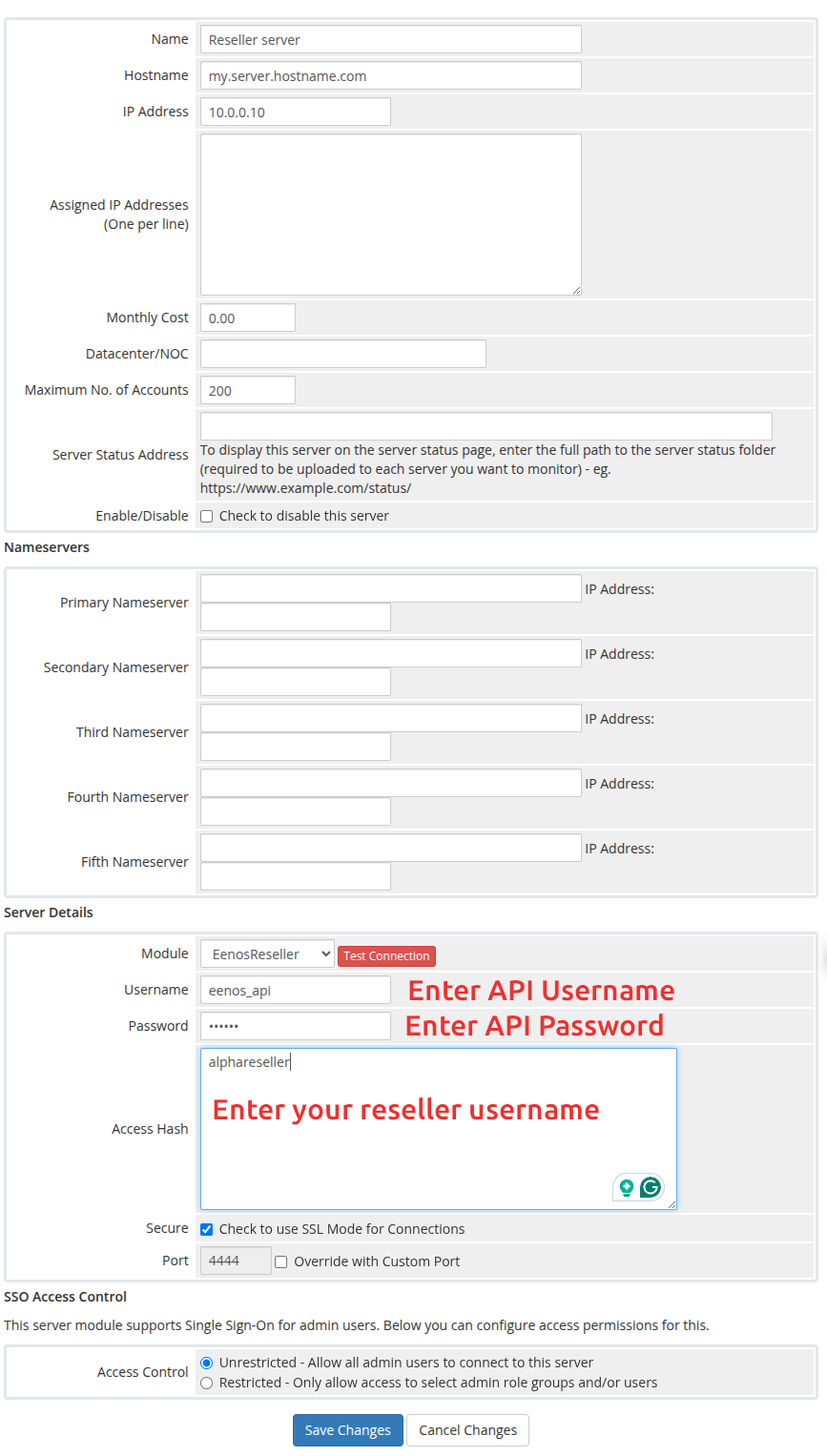
Official reseller connection example. Access Hash holds the reseller username, separate from the API username above it.
Create the server group
Create a group such as Eenos Reseller Servers, add the intended reseller server connections, and save. Select this group on the product and reopen Module Settings to load package choices.
The module sends X-RESELLER from Access Hash plus X-API-USER and X-API-PASSWORD. The API enforces account ownership, package ownership and reseller limits. Do not use root-module credentials or WAP port 5555 with this connection.
Sub-reseller hosting
Selling sub-reseller accounts requires the server's Multi-Level Reselling policy and sufficient capacity in the parent reseller. The root administrator controls this in WAP → Automation → Tweak Settings → Advanced Tweaks.
Finite parent limits constrain requested child limits; entering unlimited does not bypass them. Review Reseller createacct and product configuration before enabling sub-reseller automation.