

Configure the WHMCS Root Administrator Module
Configure Eenos server credentials, secure port 5555, connection testing and the Eenos Servers server group in WHMCS.
Use the Eenos module when you administer the Eenos server. It uses WAP API credentials with administrator scope.
Prepare the API login
Create a dedicated login in WAP → Preferences → API Manager. Follow Create API Logins for permissions and source-IP restrictions. Record the API username and password for WHMCS; do not substitute the OS root password.
Add the server
In WHMCS, open Configuration → System Settings → Servers, select Add New Server, and use Advanced Mode if needed. Labels may differ in your installed version.
| Field | Value |
|---|---|
| Name | An internal descriptive name. |
| Hostname | The Eenos server hostname; the module prefers this over IP when present. |
| IP Address | The server's reachable IP address. |
| Module | Eenos. |
| Username | WAP API username. |
| Password | WAP API password. |
| Access Hash | Leave empty; the root module does not use it for authentication. |
| Secure | Enable SSL/HTTPS mode. |
| Port | 5555, or the actual configured HTTPS endpoint using the custom-port control. |
| Nameservers | Your service's intended nameservers where required by WHMCS. |
Run Test Connection, correct any errors and save the server. Test Connection verifies API connectivity, not successful account creation or every provisioning permission.
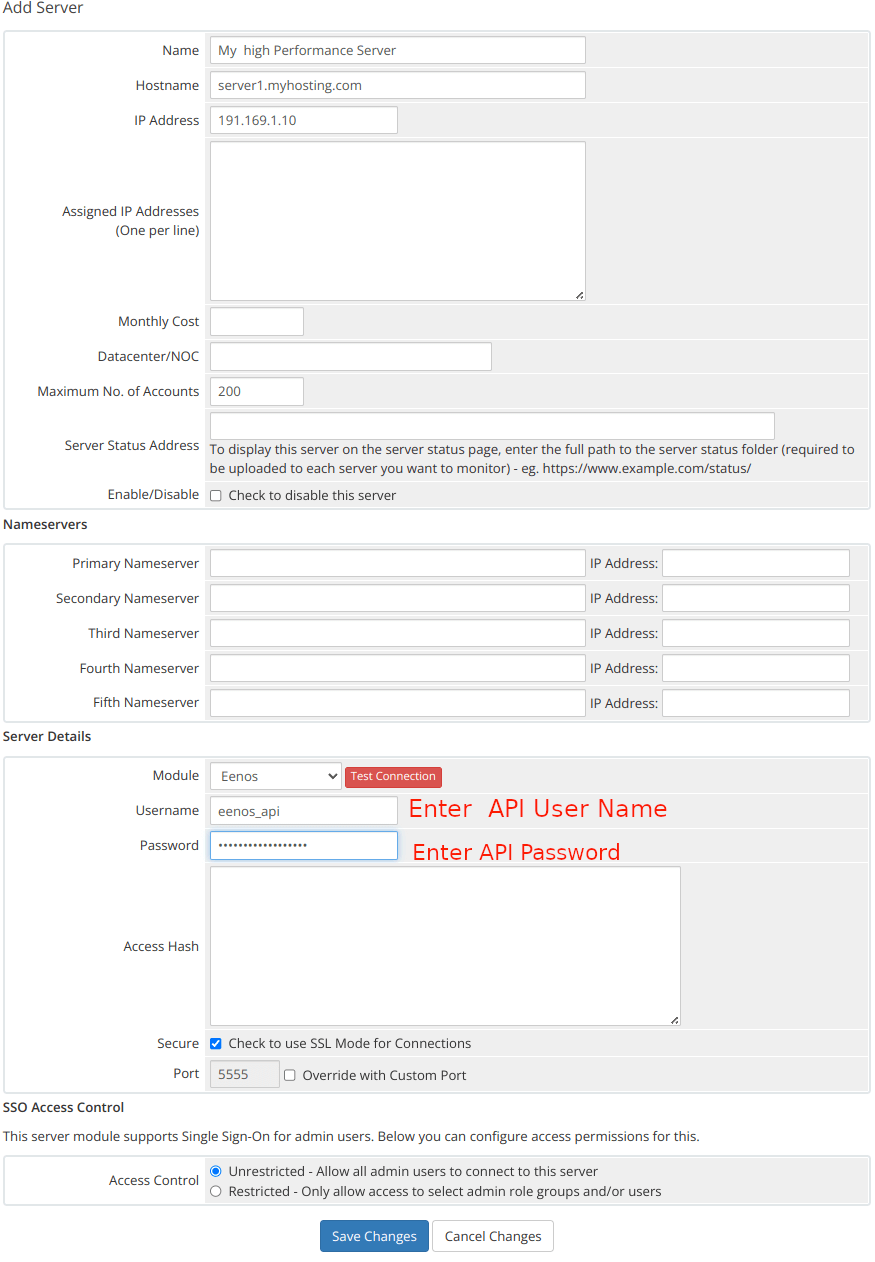
Official root module server-configuration example. Replace example hostnames and values; review SSO access control for your own staff roles.
Refresh metadata and create a server group
Use the server-list refresh control to fetch current metadata and check that the server is reachable. Then choose Create New Group, give it a name such as Eenos Servers, add the intended Eenos servers and save.
Assign this group to the hosting product before reopening its module settings. Package options are fetched from servers in the product's group; an unassigned group can leave the package selector without remote choices.
Connection behavior
The module sends X-API-USER and X-API-PASSWORD and calls the /api/ routes. Normal module operations use the WHMCS server protocol and port settings. See connection troubleshooting for current transport limitations.
Continue to product and package configuration.