

WHMCS Reseller Module Products
Map EenosReseller products to Eenos packages and configure hosting quotas, domain settings, reseller options and activation policy.
Create the intended Eenos package first. Use the EenosReseller server connection and Eenos Reseller Servers group from server configuration.
Shared hosting product
- In WHMCS, open Configuration → System Settings → Products/Services and create a product.
- Select Shared Hosting, enter a product name and choose EenosReseller as its module.
- Open Module Settings, select Eenos Reseller Servers and save.
- Reopen Module Settings, select Eenos Package Name, review overrides and save.
- Set pricing and setup timing according to your order/payment policy after a controlled provisioning test.
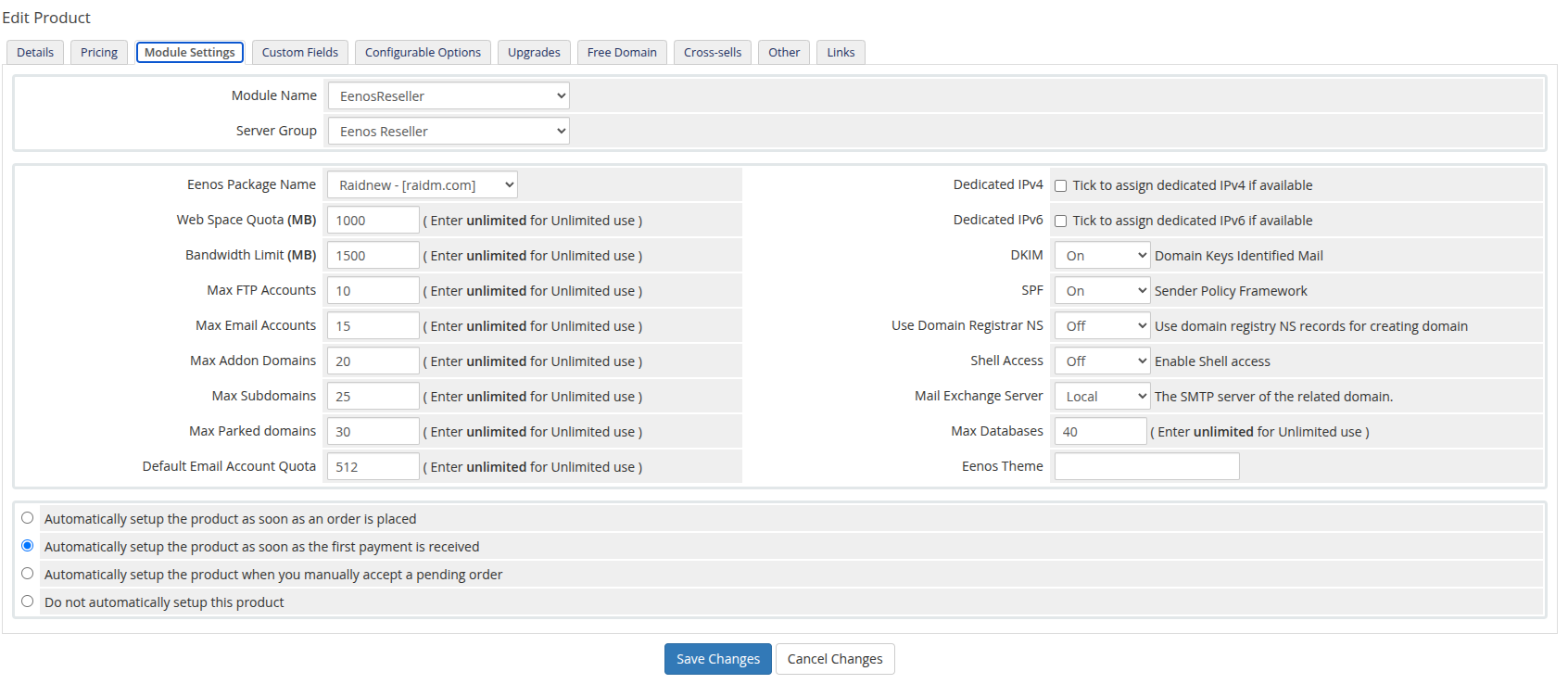
Official EenosReseller shared hosting example. The package, limits and setup selections are illustrative.
Package selection
Package labels can include a hostname. Their stored value is the package name; the label does not pin account placement to that server. If multiple servers can provision the product, keep the intended package definitions consistent across them.
Creation options
The package supplies defaults. Nonempty module overrides are sent during creation. Use numeric MB/count values as labelled or the exact keyword unlimited for supported limits. Do not use 0 as unlimited: PHP empty checks can omit it. Arbitrary nonnumeric resource text can also become unlimited, so validate entries carefully.
These are product Module Settings, not a guarantee of support for arbitrary WHMCS Configurable Options with similar names.
| Module field | Meaning |
|---|---|
| Eenos Package Name | Existing package selected for creation and package changes. |
| Dedicated IPv4 / Dedicated IPv6 | Request dedicated addresses if available and permitted. |
| Web Space Quota (MB) | Hosting account disk limit. |
| Bandwidth Limit (MB) | Hosting account bandwidth allowance. |
| DKIM / SPF | On/off values for the corresponding domain mail settings; defaults shown by the module are On. |
| Max FTP Accounts / Max Email Accounts | Account-count limits. |
| Use Domain Registrar NS | Request registrar nameserver discovery during creation; module default is Off. |
| Max Addon Domains / Max Subdomains / Max Parked domains | Domain-count limits; parked domains are domain aliases. |
| Shell Access | Request shell access; module default is Off. |
| Mail Exchange Server | Local or remote mail routing; module default is Local. |
| Max Databases | Database-count limit. |
| Default Email Account Quota | Default mailbox quota, in the API's MB units. |
| Eenos Theme | Theme identifier; the module defines default as its default value. |
See createacct validation for the server-side requirements. Enabling an option does not install a missing service or expand API permissions.
Reseller hosting product
Choose Reseller Hosting as the WHMCS product type and keep EenosReseller as the module. This exposes additional reseller options. The parent reseller must have sufficient remaining capacity, package ownership and permission to create child resellers. WAP Multi-Level Reselling policy must permit the hierarchy. Finite parent limits constrain child requests; unlimited does not bypass them.
| Additional field | Meaning |
|---|---|
| Reseller Ownership | Allow the reseller to own its own hosting account; changes ownership semantics. Enable only when this is the intended policy. |
| Limit Reseller by Number | Maximum allowed account count. |
| Reseller Disk Quota (MB) | Aggregate resource allowance across subaccounts. |
| Reseller Bandwidth (MB) | Aggregate bandwidth allowance across subaccounts. |
Aggregate reseller allowances are distinct from the reseller's own hosting quota. Assess ownership and overselling policy before offering unlimited resources.
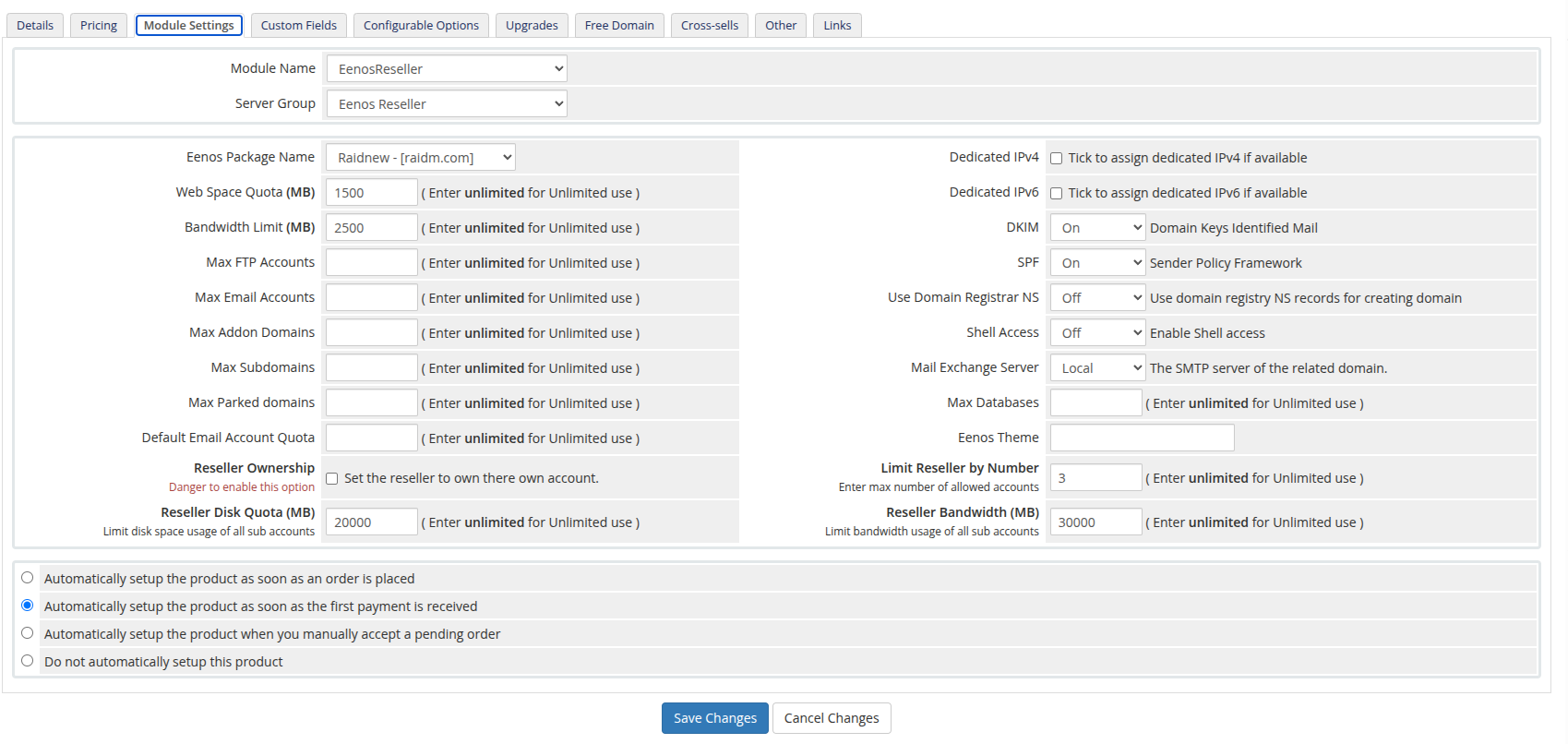
Official EenosReseller reseller hosting example; use limits permitted by your server and account policy.
Package changes and activation
The Change Package callback sends the selected package name; it does not replay every creation-time override. Review the target package before an upgrade or downgrade.
Keep automatic setup disabled until configuration is reviewed. A provisioning test creates a real Eenos account, so use a designated test service. After acceptance, enable setup timing appropriate for your billing policy.